 Syorai
Inbox
Everything waiting for review in one place — from a photo, a PDF or a conversation — and your tasks, with filters for what is overdue, upcoming or completed, and search across everything you have saved.
Features
Five tabs, one calm system. This is what Syorai does in the app today.
Everything waiting for review in one place — from a photo, a PDF or a conversation — and your tasks, with filters for what is overdue, upcoming or completed, and search across everything you have saved.
Day, week and month views. A timeline of deadlines, a workload bar that says when estimates are missing, and a list of what isn’t scheduled yet.
The centre of the app. A short, written briefing: what needs attention, a suggestion, and what can wait, with the proposals waiting for your approval. Speak or type to Syorai from here; a clear typed request can be added straight away.
Tasks completed, follow-through, when you tend to finish things (once there is enough history), goal progress and categories — in your own numbers.
Your profile, theme and text size, notifications, reminders and your daily-briefing time, voice settings, connected services, your plan and Syorai credits, help and support, your data and your account.
Tasks, goals and categories
Everything sits in a simple structure: categories hold goals, and goals hold tasks. Tasks carry dates, priorities and notes; goals break into milestones, so progress is something you can see.
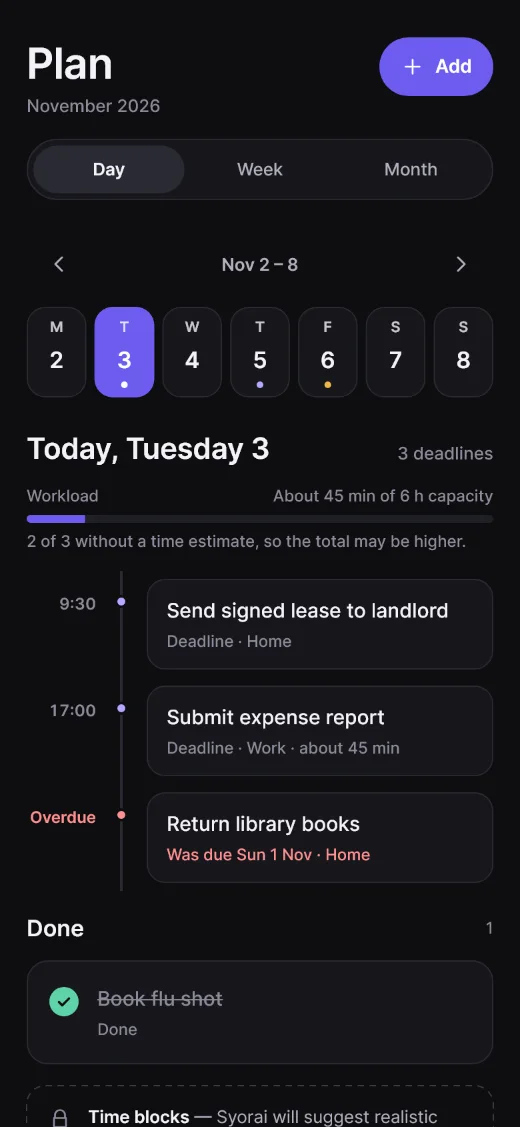
Sample content.
Voice, photos and documents
Talk to Syorai hands-free, or attach a photo or PDF and let it find the dates and actions. Whatever it finds waits in a review sheet.
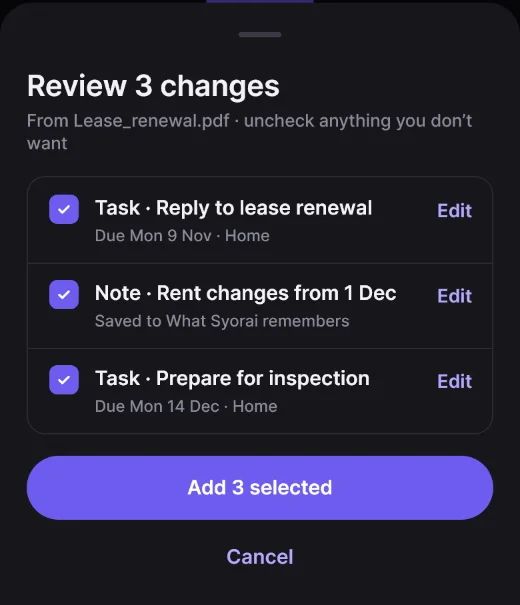
Working Documents and sharing
Open a task’s Working Document to write notes and drafts, preview them and come back to them later. Premium adds the AI assistant inside the document and PDF export.
Messages from Syorai about your account, credits and support are kept in a notification centre in Me, so a missed push is never lost. Reminders and your daily briefing show their real content when you expand them.
Share a Working Document with someone through a single-use code, or send a copy of a task (Premium). What you share can be seen by the person who receives it.
Your information
Choose Download my data in Me to get a file of what Syorai holds about you.
You can delete your account in the app. Here is how it works.
Google Calendar, Outlook Calendar, Todoist and Microsoft To Do can be connected from Me as each is set up. You approve access on the provider’s own page and can disconnect at any time. Other services are marked “Coming later”.
Next
From a spoken sentence to an approved plan in four steps.